Easing
Select easing curves from the visual easing picker to control animation acceleration and deceleration.
Easing controls how an animation accelerates and decelerates over time. A power2.out ease starts fast and slows to a stop; a back.out overshoots the target and snaps back — same duration, completely different feel.
Location
Left Panel → Animation tab → Functional Properties → Ease
Ease is a functional property — it applies to the entire animation tween regardless of which tab (From, To, or Set) is active. The control is always visible inline in the property row; there is no toggle or expand step.
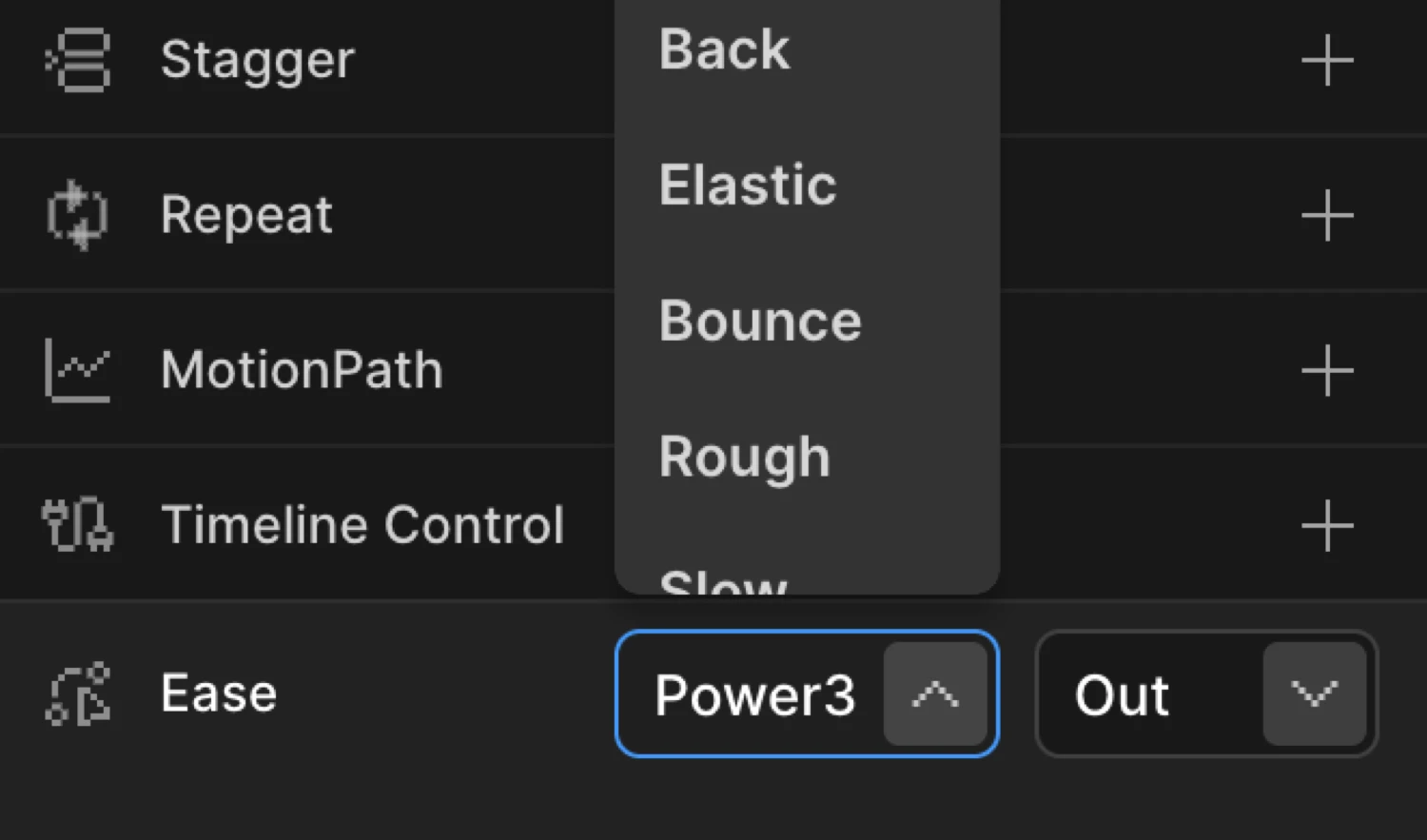
Controls
The Ease node contains two dropdowns shown side by side.
| Control | Description |
|---|---|
| Family | The easing curve family (e.g. Power2, Back, Elastic). |
| Direction | in / out / inOut — hidden when family is Default or None. |
Selecting Default resets the animation to the built-in default (power1.inOut) and removes the Ease node entirely. This is the same as not setting an ease in the SDK.
Easing families
| Family | Character |
|---|---|
| Default | Removes the Ease node; uses the SDK default (power1.inOut). |
| Power1 | Gentle, smooth acceleration — the mildest Power ease. |
| Power2 | Medium acceleration — a reliable general-purpose ease. |
| Power3 | Strong acceleration — noticeable snap. |
| Power4 | Very strong acceleration — sharp, punchy movement. |
| Back | Overshoots the target, then settles — adds a spring feel. |
| Elastic | Oscillates past the end value, like a rubber band. |
| Bounce | Bounces at the end, like a ball hitting the floor. |
| Rough | Adds jitter for an organic, hand-drawn look. |
| Slow | Spends most of its time near the middle of the range. |
| Circ | Based on a circular arc — abrupt ease-out finish. |
| Expo | Exponential curve — extreme contrast between start and end speed. |
| Sine | Gentle sinusoidal curve — the softest ease after Power1. |
| None | Linear — constant speed with no acceleration. No direction suffix. |
Direction options
| Direction | Behavior |
|---|---|
in | Starts slow, accelerates toward the end. |
out | Starts fast, decelerates toward the end. Most natural for entrances. |
inOut | Slow at both ends, fastest in the middle. Smooth for loops or scrub. |
The Direction dropdown is hidden when Family is set to Default or None — neither has a meaningful direction.
All five dots travel the same distance in the same duration — only the easing curve differs.
SDK equivalent
The builder outputs the ease as a lowercase string: family name + . + direction.
import { Motion } from '@motion.page/sdk';

// power2.out — medium ease out (most common)
Motion('hero', '.hero-text', {
  from: { opacity: 0, y: 40 },
  duration: 0.7,
  ease: 'power2.out',
}).onPageLoad();// back.out — slight overshoot on entrance
Motion('card', '.card', {
from: { opacity: 0, scale: 0.9 },
duration: 0.5,
ease: 'back.out',
}).onScroll();// none — linear, constant speed (good for loops)
Motion('spinner', '.loader-ring', {
to: { rotation: 360 },
duration: 1,
ease: 'none',
repeat: -1,
}).onPageLoad();For the full list of valid ease strings and a visual comparison, see Easing in the SDK.
Common patterns
Entrance animations — power2.out
Start fast and slow to a stop. This matches how physical objects feel when they arrive — momentum decelerates naturally.
Motion('fade-up', '.section-title', {
  from: { opacity: 0, y: 30 },
  duration: 0.6,
  ease: 'power2.out',
}).onScroll();
Departure animations — power2.in
Start slow and accelerate away. Objects that leave the screen feel purposeful, not floaty.
Motion('modal-exit', '.modal', {
  to: { opacity: 0, scale: 0.95 },
  duration: 0.3,
  ease: 'power2.in',
}).onClick({ selector: '.close' });
Scroll-scrub — none or power1.inOut
For animations driven by scroll position, none (linear) maps position 1:1. power1.inOut softens the feel at the edges of the scrub zone.
Motion('parallax', '.bg-image', {
  to: { y: -80 },
  ease: 'none',
}).onScroll({ scrub: 1 });
Springy entrance — elastic.out
Overshoots and oscillates back. Use sparingly — best for small elements like badges, icons, or tooltips.
Motion('badge', '.notification-dot', {
  from: { scale: 0 },
  duration: 0.8,
  ease: 'elastic.out',
}).onPageLoad();
Related
- Easing in the SDK — Full reference with visual curve comparison and all valid strings
- From, To & Set — How functional properties relate to animation mode tabs
- Stagger — Cascade timing across multiple elements
- Repeat — Loop animations and control yoyo direction