Timeline Control
Control other timelines from within a timeline — play, pause, reverse, restart.
Timeline Control lets one timeline orchestrate others — triggering a secondary animation when the current one starts, completes, or updates. Each action maps a lifecycle event on the current timeline to a playback command on a named target timeline.
Link timelines together: play, pause, reverse, restart, seek, or sync the progress of another named timeline in response to this animation’s events.
Location
Left Panel → Animation tab → Functional Properties → Timeline Control
Timeline Control is a functional property — it is direction-agnostic. The same actions apply regardless of whether the From, To, or Set tab is active.
Enable Timeline Control
Click the toggle next to Timeline Control to enable it. The section expands to reveal an empty action list and an + Add Action button.
Click + Add Action to add a new action entry. Each entry can be configured independently, and you can add as many entries as needed.
Controls
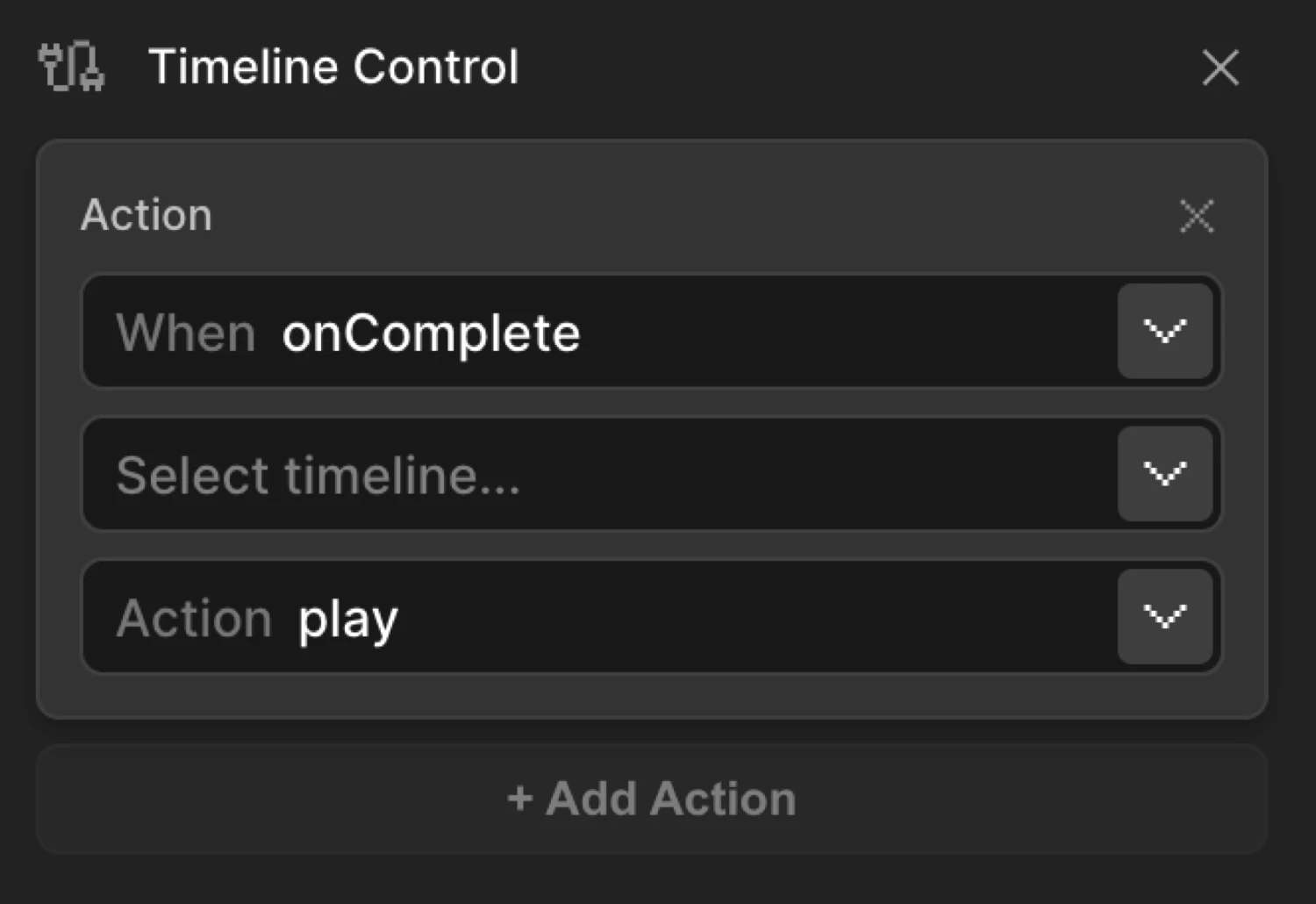
Each action entry contains four controls:
| Control | Description |
|---|---|
| When | The lifecycle event on the current timeline that triggers the action — onStart, onComplete, or onUpdate. |
| Target | The name of another timeline to control. The dropdown lists all other timelines on the page by their timeline name. |
| Action | What to do to the target timeline — play, pause, reverse, restart, reset, complete, seek, progress, or timeScale. |
| Value | Appears for seek (time in seconds), progress (0–1), and timeScale (speed multiplier). Hidden for other actions. |
When (event) options
| Value | Fires when… |
|---|---|
onStart | The current timeline begins playing. |
onComplete | The current timeline finishes. |
onUpdate | Every animation frame while the current timeline is active. Useful for progress sync. |
Action options
| Action | Description | Needs value? |
|---|---|---|
play | Play the target timeline from its current position. | No |
pause | Pause the target timeline. | No |
reverse | Play the target timeline backward from its current position. | No |
restart | Reset the target to time 0 and play forward. | No |
reset | Reset the target to time 0 without playing. | No |
complete | Jump the target to its end state immediately. | No |
seek | Jump the target to a specific time in seconds. | Yes — time (s) |
progress | Set the target’s progress (0–1). When used with onUpdate, syncs progress automatically. | Yes — 0–1 |
timeScale | Set the target’s playback speed multiplier. | Yes — speed |
Progress sync (onUpdate + progress)
When When is set to onUpdate and Action is set to progress, the value field disappears and a special Progress Link mode activates. The current timeline’s progress is automatically mirrored onto the target timeline every frame — useful for driving a secondary animation at the same rate as a scroll-linked one.
How it works
-
Name your timelines. Each timeline has a name field at the top of the Left Panel (tooltip: “Rename the timeline.”). Timeline Control references other timelines by this name. The current timeline is automatically excluded from the target list.
-
Enable Timeline Control on the timeline you want to use as the controller (the one that triggers actions in others).
-
Add an action entry. Choose when the action fires (
onStart,onComplete,onUpdate), which target timeline to affect, and what action to perform. -
Repeat for as many cross-timeline relationships as needed. A single timeline can control multiple others, and the same target can receive multiple actions from different events.
When the page loads and animations run, Motion.page injects these relationships into the runtime — no additional code needed.
Use cases
-
Chained entrance sequences — Play a secondary hero animation only after the page-load reveal completes. Set the reveal timeline’s
onCompletetoplaythe hero timeline. -
Pause on enter — When a scroll animation starts (
onStart), pause a looping background animation to reduce visual noise. -
Progress mirroring — Use
onUpdate+progressto drive a progress bar or decorative element at exactly the same rate as a scroll-linked animation. -
Coordinated exit — When a modal intro finishes (
onComplete),reversethe overlay fade so both animations end at the same time. -
Speed control — Set
timeScaleon a looping animation when a key interaction starts to slow it down for emphasis.
SDK equivalent
In the SDK, Timeline Control is the timelineControl property in AnimationConfig. It accepts an array of action entries — each specifying the triggering event, target timeline name, action, and optional value.
import { Motion } from "@motion.page/sdk";

// A reveal animation that triggers a secondary animation on complete
Motion("hero-reveal", "#hero", {
  from: { opacity: 0, y: 40 },
  duration: 0.8,
  ease: "power2.out",
  timelineControl: [
    {
      event: "onComplete",
      targetTimeline: "hero-badge",
      action: "play",
    },
  ],
}).onPageLoad();

// The secondary animation starts paused — Timeline Control will play it
Motion("hero-badge", ".hero-badge", {
  from: { opacity: 0, scale: 0.8 },
  duration: 0.4,
  ease: "back.out",
}).onPageLoad({ paused: true });
For the full SDK reference, see Timeline Control in the SDK.
Common patterns
Chain animations on complete
Play a follow-up animation only after the first one finishes. Set the first timeline’s onComplete → play on the second.
import { Motion } from "@motion.page/sdk";

// Title slides in first
Motion("title-in", "h1", {
  from: { opacity: 0, y: 30 },
  duration: 0.6,
  ease: "power2.out",
  timelineControl: [
    { event: "onComplete", targetTimeline: "subtitle-in", action: "play" },
  ],
}).onPageLoad();

// Subtitle waits until title is done
Motion("subtitle-in", ".subtitle", {
  from: { opacity: 0, y: 20 },
  duration: 0.5,
  ease: "power2.out",
}).onPageLoad({ paused: true });
Pause a looping animation on scroll start
When a scroll-triggered animation begins, pause a background loop so it doesn’t compete for attention.
import { Motion } from "@motion.page/sdk";

// Background pulse — runs indefinitely
Motion("bg-pulse", ".bg-orb", {
  to: { scale: 1.15, opacity: 0.6 },
  duration: 2,
  ease: "power1.inOut",
  repeat: { times: -1, yoyo: true },
}).play();

// Scroll reveal — pauses the loop when it starts
Motion("section-reveal", ".section-content", {
  from: { opacity: 0, y: 50 },
  duration: 0.7,
  ease: "power3.out",
  timelineControl: [
    { event: "onStart", targetTimeline: "bg-pulse", action: "pause" },
    { event: "onComplete", targetTimeline: "bg-pulse", action: "play" },
  ],
}).onScroll({
  each: true,
  toggleActions: "play none none none",
  start: "top 80%",
});
Mirror scroll progress onto a decorative element
Link two scroll-driven animations so the decorative element tracks the main one exactly, without writing scroll event listeners.
import { Motion } from "@motion.page/sdk";

// Primary scroll animation
Motion("page-scroll", ".hero-text", {
  from: { opacity: 0 },
  to: { opacity: 1 },
  duration: 1,
  timelineControl: [
    { event: "onUpdate", targetTimeline: "progress-bar", action: "progress" },
  ],
}).onScroll({ scrub: true, start: "top top", end: "bottom bottom" });

// Progress bar — driven by the primary animation's progress
Motion("progress-bar", ".progress-fill", {
  from: { scaleX: 0 },
  to: { scaleX: 1 },
  duration: 1,
}).onScroll({ scrub: true, paused: true });
Tips
-
Name timelines clearly. The Target dropdown shows timeline names exactly as entered. Use descriptive, consistent names like
hero-reveal,section-2-in, ormodal-openrather than the defaultTimeline 1. -
The current timeline is excluded. A timeline cannot control itself — the dropdown only shows other timelines on the page.
-
Multiple actions stack. Add as many action entries as needed. For example, a single
onCompletecan triggerplayon one timeline andreverseon another simultaneously. -
Paused start required for chained play. If you want Timeline Control to
playa target, the target must start paused (use{ paused: true }in the trigger options or leave the trigger unset). Otherwise the target will already be playing before the action fires. -
onUpdatefires every frame. UseonUpdateonly forprogresssync — avoid triggering heavy operations on every frame. -
Ordering matters for
onStart. If two timelines load at the same time, the one acting as the controller must initialize before its targets. Page Load trigger order follows the timeline list in the Left Panel.
Related
- From, To & Set — How functional properties relate to the animation mode tabs
- Scroll Trigger — Scroll-driven triggers commonly paired with Timeline Control for chained effects
- Repeat — Loop animations that can be paused or reversed via Timeline Control
- Timeline Control in the SDK — Full SDK reference including playback methods and state inspection