Text Color
Animate font and text colors between any two values in the builder.
Text Color animates the CSS color property of an element — transitioning the font color between any two values. Use it to highlight headings on scroll, shift link colors on hover, or build attention-grabbing color reveals.
Location
Left Panel → Animation tab → Visual Properties → Text Color
Enable Text Color
Click the toggle next to Text Color to enable it. The row expands to reveal the color picker control.
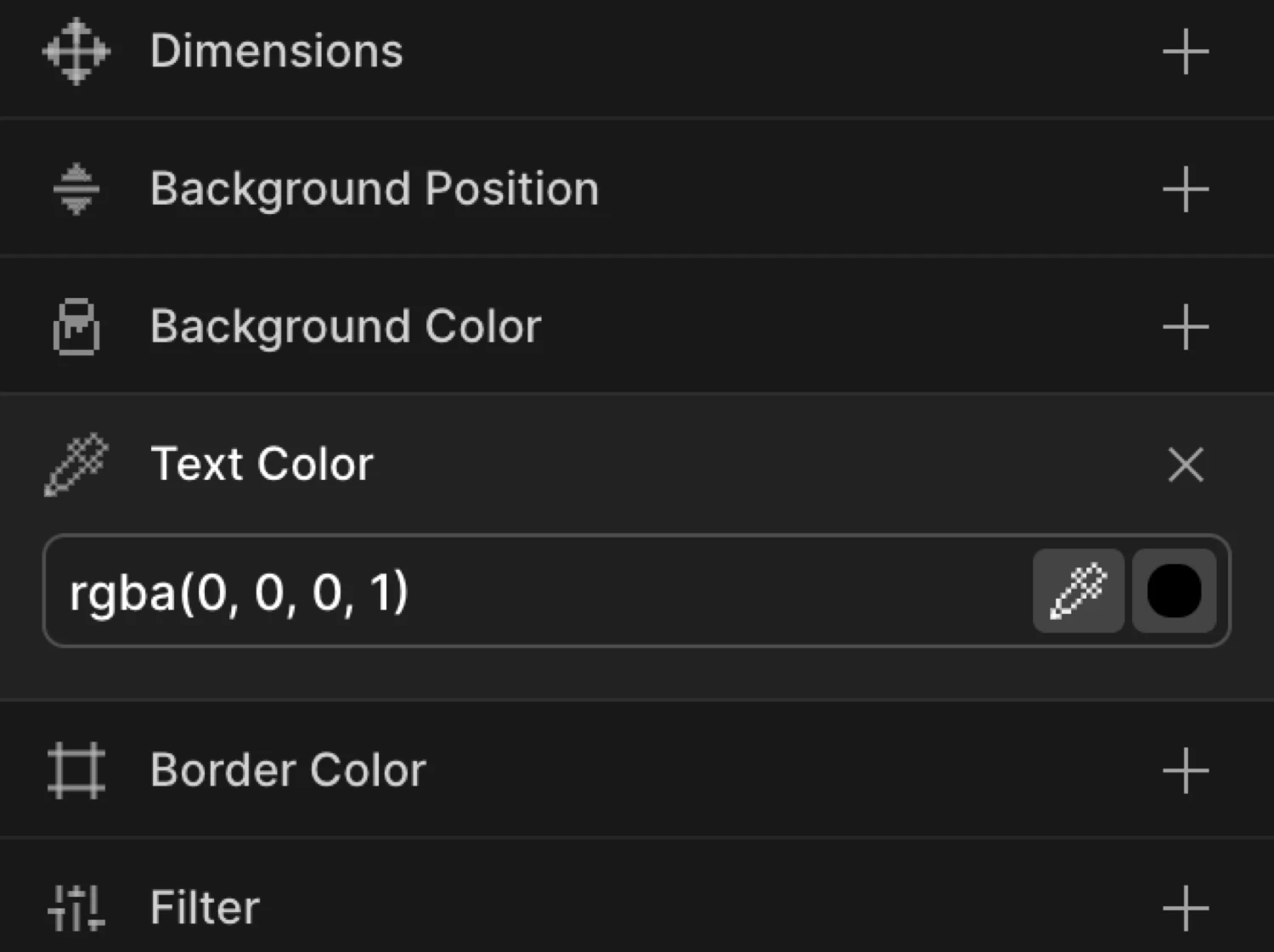
Controls
| Control | Description |
|---|---|
| Hex input | Type any CSS color value — hex (#6633EE), RGB, RGBA, HSL, or a named color. |
| Color swatch | Click the swatch to open the visual color picker with hue/saturation/alpha controls. |
| Eye dropper | Sample any color from the screen using the browser’s native eye dropper (supported browsers only). |
The color picker accepts any standard CSS color format. You can freely mix formats between the From and To values — for example, from a named color and to a hex value.
From mode — color reveal
Switch to the From tab, enable Text Color, and set a starting color. The element begins at that color and animates to its natural CSS color value.
This is useful for text reveals: start with a muted or near-invisible color (#cccccc, rgba(0,0,0,0.1)) and let the text transition into its final styled color as the animation plays.
To mode — color shift
Switch to the To tab, enable Text Color, and set a destination color. The element animates from its natural CSS color to the value you specify.
Use To for hover highlights, scroll-triggered emphasis, or any interaction where text should shift to a new color and optionally reverse back.
The heading starts white and transitions to a vibrant purple — equivalent to from: { color: '#ffffff' } with a to value matching the element’s natural CSS color, or to: { color: '#6633EE' } in a hover/scroll setup.
SDK equivalent
Text Color maps to the color property in the SDK’s from and to objects.
Color reveal on scroll (From mode):
import { Motion } from '@motion.page/sdk';

Motion('text-reveal', '.heading', {
  from: { color: 'rgba(255,255,255,0.15)' },
  duration: 0.8,
  ease: 'power2.out',
}).onScroll({ scrub: true });
Hover highlight (To mode):
Motion('text-highlight', '.nav-link', {
  to: { color: '#6633EE' },
  duration: 0.2,
  ease: 'power1.out',
}).onHover({ each: true, onLeave: 'reverse' });
Explicit from → to transition:
// Animate between two specific colors — neither matches the element's natural CSS
Motion('color-shift', '.tag', {
  from: { color: '#999999' },
  to:   { color: '#FF6633' },
  duration: 0.5,
  ease: 'power2.inOut',
}).onScroll({ scrub: true });
See Colors in the SDK for the full color animation reference.
Common patterns
Highlight text on scroll
Enable Text Color on the To tab with an accent color (e.g., #6633EE). Set the trigger to Scroll with Scrub enabled. The heading color shifts from its natural CSS color to the accent as the section scrolls into view.
Motion('scroll-highlight', '.section-title', {
  to: { color: '#6633EE' },
  duration: 1,
  ease: 'none',
}).onScroll({ scrub: true });
Hover text color
Enable Text Color on the To tab. Set the trigger to Hover with Reverse on leave enabled. Each link changes color on mouse enter and reverts on mouse leave.
Motion('hover-color', '.menu-item', {
  to: { color: '#FF6633' },
  duration: 0.2,
  ease: 'power1.out',
}).onHover({ each: true, onLeave: 'reverse' });
Alternating heading colors (loop)
Set Text Color on the To tab to an alternate palette color. Enable Repeat with Yoyo on and Times set to -1. The heading color oscillates between two values indefinitely.
Motion('color-loop', '.accent-heading', {
  to: { color: '#FF6633' },
  duration: 1.2,
  ease: 'sine.inOut',
  repeat: { yoyo: true, times: -1 },
}).onPageLoad();
Fade-in text using color
Combine Text Color and Opacity on the From tab. Set color to a near-transparent value and opacity to 0. The text fades in while its color warms up — a richer entrance than opacity alone.
Motion('text-entrance', '.body-copy', {
  from: { color: '#aaaaaa', opacity: 0 },
  duration: 0.7,
  ease: 'power2.out',
}).onScroll();
Tips
colortargets all text within the element, including inline children (<span>,<em>,<strong>) unless those elements have their owncolorset in CSS. Child elements with an explicitcolorrule will not be affected.- Links inherit
colorby default. If your element contains<a>tags without a dedicated color style, they will animate along with the parent — which may or may not be what you want. - CSS variables work — enter
var(--brand-color)directly in the hex input to animate to a design token. - The SDK interpolates smoothly between any supported format: hex, RGB, RGBA, HSL, HSLA, or named colors. You can mix formats freely between From and To.
- For very short durations (<
0.15s), a linear or power1 ease reads cleanest. Elastic eases on color look odd.
Related
- Background Color — Animate the element’s background fill
- Border Color — Animate border color separately from text
- Text Splitter — Animate individual characters or words, each with their own color transition
- Colors in the SDK — Full SDK reference for
color,backgroundColor, andborderColor - From, To & Set — How the three animation modes work and when to use each