Stagger
Configure stagger for multiple-target animations.
Stagger adds a cascading delay between each element in a multi-target animation. Instead of all elements animating at the same time, each one starts slightly after the previous — producing a wave or ripple effect.
Animate multiple targets in a sequence, by adding delay to each element. Use a common selector or multiple selectors.
Location
Left Panel → Animation tab → Functional Properties → Stagger
Stagger is a functional property — it is direction-agnostic. The same value applies whether the From, To, or Set tab is active.
Enable stagger
Click the toggle next to Stagger to enable it. The row expands to reveal the mode label, time input, and direction dropdown.
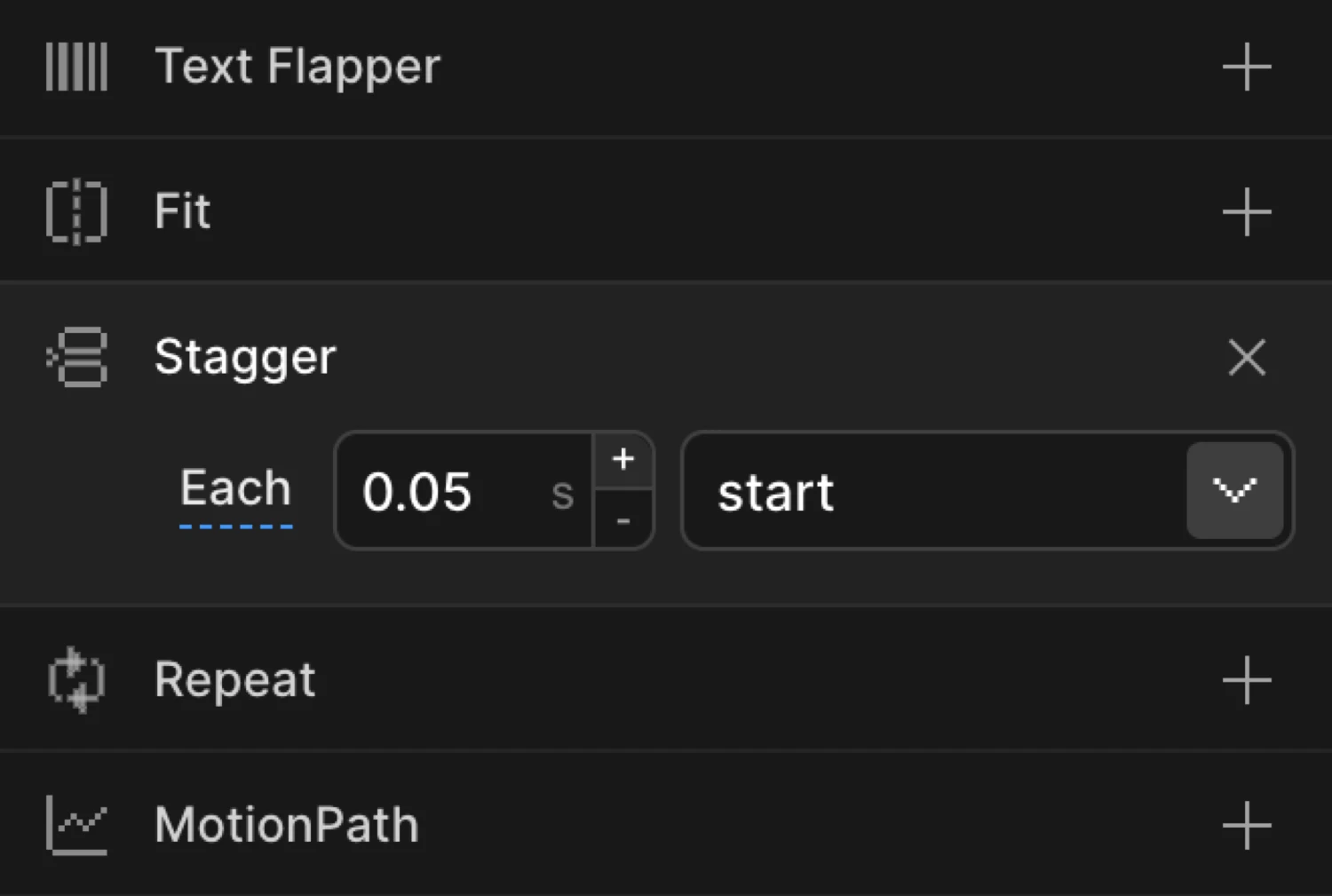
Controls
| Control | Description |
|---|---|
| Mode label (Each / Amount) | Click to toggle between the two distribution modes. |
| Time input | Delay value in seconds. |
| From dropdown | The direction or position from which the stagger originates. |
Each vs Amount
Each sets a fixed delay between consecutive elements. If you have 5 elements and set each to 0.1, the delays are 0s, 0.1s, 0.2s, 0.3s, 0.4s.
Amount distributes a total duration across all elements. If amount is 0.4 and there are 5 elements, each element starts 0.08s after the previous one.
| Mode | Input step | Best for |
|---|---|---|
| Each | 0.01 s | Consistent per-element timing |
| Amount | 0.1 s | Proportional pacing regardless of element count |
Click the Each or Amount label to switch modes. The current value moves to the new mode automatically.
From options
| Value | Behavior |
|---|---|
start | Stagger begins at the first element and moves forward. Default. |
end | Stagger begins at the last element and moves backward. |
center | Stagger radiates outward from the middle element. |
edges | Stagger begins at both ends and converges toward the center. |
random | Each element receives a random delay within the stagger range. |
Each card starts 0.1s after the previous one — equivalent to stagger: 0.1 in the SDK (Each mode, from start).
SDK equivalent
The stagger property maps directly to the SDK’s AnimationConfig.stagger field.
Simple (Each, from start):
import { Motion } from '@motion.page/sdk';

Motion('cards-in', '.card', {
  from: { opacity: 0, y: 20 },
  duration: 0.5,
  ease: 'power2.out',
  stagger: 0.1,
}).onPageLoad();
When mode is Each and from is start, the builder outputs a plain number — the most compact form.
Each with a custom From direction:
Motion('cards-center', '.card', {
  from: { opacity: 0, scale: 0.8 },
  duration: 0.5,
  ease: 'back.out',
  stagger: { each: 0.08, from: 'center' },
}).onScroll();
Amount mode:
Motion('cards-amount', '.card', {
  from: { opacity: 0, y: 30 },
  duration: 0.6,
  ease: 'power2.out',
  stagger: { amount: 0.4 },
}).onPageLoad();
SDK-only stagger options
The SDK accepts additional stagger options not exposed in the builder UI. Use Custom Code or the SDK directly when you need these:
| Option | Type | Description |
|---|---|---|
grid | 'auto' | [rows, cols] | Enable 2D stagger for grid layouts. 'auto' reads the layout automatically. |
axis | 'x' | 'y' | When using grid, restrict the stagger wave to one axis. |
ease | string | Ease applied to the stagger distribution itself (not the animation ease). |
// 2D grid stagger — ripple from center
Motion('grid-ripple', '.grid-item', {
  from: { opacity: 0, scale: 0.7 },
  duration: 0.4,
  stagger: {
    each: 0.05,
    from: 'center',
    grid: 'auto',
  },
}).onScroll();
For the full SDK reference, see Stagger in the SDK.
Common patterns
Cascade on page load
Enable Stagger with each: 0.08, from: start. Add Opacity and Translate on the From tab. Every element in the selector enters in sequence.
Motion('list-in', '.list-item', {
  from: { opacity: 0, y: 24 },
  duration: 0.5,
  ease: 'power2.out',
  stagger: 0.08,
}).onPageLoad();
Radiate from center
Set from: center. The middle element animates first, followed by its neighbors in both directions — useful for button groups or icon rows.
Motion('nav-items', '.nav-item', {
  from: { opacity: 0, y: -10 },
  duration: 0.4,
  ease: 'power1.out',
  stagger: { each: 0.06, from: 'center' },
}).onPageLoad();
Random reveal
Set from: random for an organic, unordered entrance. Elements appear in a shuffled sequence on every page load.
Motion('gallery', '.gallery-item', {
  from: { opacity: 0, scale: 0.9 },
  duration: 0.5,
  ease: 'power2.out',
  stagger: { each: 0.07, from: 'random' },
}).onScroll();
Stagger with Text Splitter
Combine Stagger with Text Splitter to animate individual characters or words. Set split: 'words' and stagger: 0.05 to reveal each word in sequence.
Motion('headline', 'h1', {
  split: 'words',
  mask: true,
  from: { y: '110%' },
  duration: 0.6,
  ease: 'power3.out',
  stagger: { each: 0.06, from: 'start' },
}).onPageLoad();
Related
- From, To & Set — How functional properties relate to the animation mode tabs
- Text Splitter — Animate individual characters, words, or lines with stagger
- Ease — Control the acceleration of individual elements
- Repeat — Loop animations with optional yoyo
- Stagger in the SDK — Full SDK reference for the
staggeroption