Repeat & Yoyo
Loop animations with repeat count, infinite looping, and yoyo.
Repeat loops an animation a set number of times — or forever. Yoyo makes the animation reverse on each cycle, creating a back-and-forth effect. Both are available at the individual node level and at the timeline level.
Repeat in a loop or any number of repetitions. Use -1 as a repeat value for infinite loop.
Location
Node-level: Left Panel → Animation tab → Functional Properties → Repeat
Timeline-level: Left Panel → Trigger Section → Advanced Options → Loop
Repeat is a functional property — it is direction-agnostic. The same value applies whether the From, To, or Set tab is active.
Enable Repeat
Click the toggle next to Repeat to enable it. The row expands to reveal the repeat count input, delay input, and the Yoyo toggle.
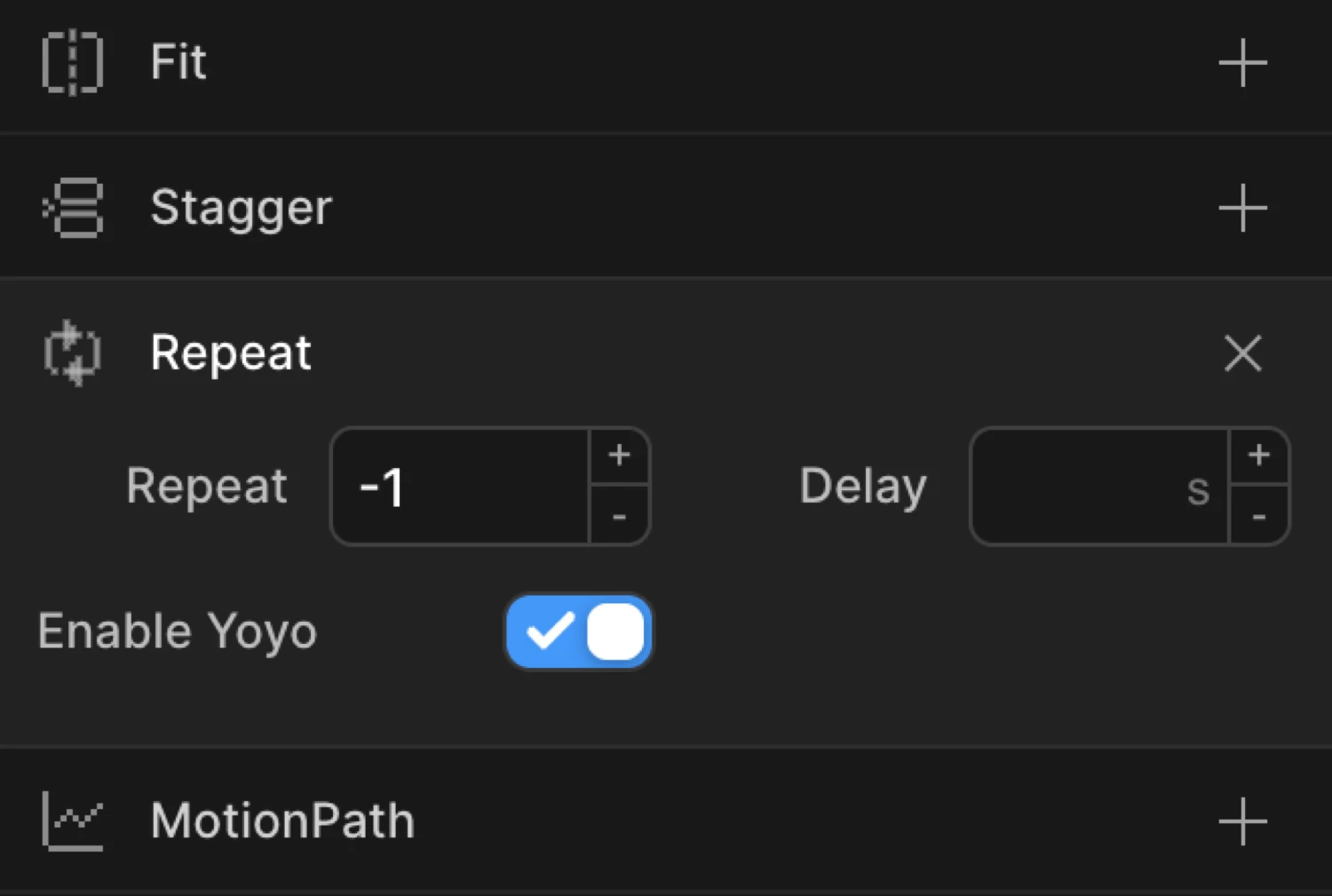
Controls
| Control | Description |
|---|---|
| Repeat count | Number of additional times the animation plays. Use -1 for an infinite loop. Use 2 to play 3 times total (initial play + 2 repeats). |
| Delay | Pause in seconds between each repeat cycle. |
| Yoyo | Toggle that causes the animation to reverse direction on each repeat cycle — playing forward, then backward, then forward, and so on. |
Node-level vs Timeline-level
There are two places to configure repeat in the builder, and they affect different scopes of the animation:
Node-level repeat
Set on an individual animation node via Functional Properties → Repeat. Only that node’s animation loops within the timeline. Other nodes continue playing normally. The timeline itself finishes after all nodes have completed their loops.
Use this when you want one element to pulse or bounce while the rest of the page enters once.
Timeline-level repeat
Found in Left Panel → Trigger Section → Advanced Options → Loop (the toggle labelled with tooltip: “Apply repeat to the entire timeline”).
When enabled, the entire timeline repeats after all nodes have finished playing — every animation in the sequence restarts together. This is the right choice when you want a complete animation sequence to loop as a unit.
The timeline-level repeat exposes the same three controls: repeat count, delay between cycles, and Yoyo.
Yoyo
Yoyo reverses the animation on each repeat cycle. Instead of snapping back to the start position and replaying forward, the element smoothly animates back to where it started — then forward again — alternating on every cycle.
- Yoyo off: forward → reset → forward → reset → …
- Yoyo on: forward → backward → forward → backward → …
Yoyo is ideal for looping effects that need to look continuous, like a pulsing button, a bouncing icon, or a breathing glow. Without yoyo, the reset between cycles is a hard jump that often looks unpolished.
The box moves right then smoothly reverses back — this is the Yoyo effect with an infinite repeat (-1). In the builder: Repeat count: -1, Yoyo: on.
SDK equivalent
Repeat and Yoyo map to the repeat property in the SDK config, which accepts a count number or an object with times, yoyo, and delay.
Infinite loop (no yoyo):
import { Motion } from '@motion.page/sdk';

Motion('spinner', '.spinner', {
  to: { rotation: 360 },
  duration: 1,
  ease: 'none',
  repeat: -1,
}).onPageLoad();
Finite repeat with Yoyo:
Motion('bounce', '.icon', {
  to: { y: -20 },
  duration: 0.5,
  ease: 'power2.inOut',
  repeat: { times: 3, yoyo: true },
}).onPageLoad();
Infinite Yoyo with repeat delay:
Motion('pulse', '.cta-button', {
  to: { scale: 1.08 },
  duration: 0.8,
  ease: 'sine.inOut',
  repeat: { times: -1, yoyo: true, delay: 0.2 },
}).onPageLoad();
For the full SDK reference, see Repeat & Yoyo in the SDK.
Common patterns
Infinite pulse
Scale an element up and back down forever. Enable Repeat with count -1 and Yoyo on. Add Scale on the To tab.
Motion('pulse', '.badge', {
  to: { scale: 1.12 },
  duration: 0.9,
  ease: 'sine.inOut',
  repeat: { times: -1, yoyo: true },
}).onPageLoad();
Bounce with Yoyo
Translate an element up and back down a fixed number of times. Set repeat count to 2 (plays 3 times total) and Yoyo on.
Motion('bounce', '.arrow-icon', {
  to: { y: -12 },
  duration: 0.45,
  ease: 'power2.out',
  repeat: { times: 2, yoyo: true },
}).onPageLoad();
Loading spinner
Rotate an element continuously. No yoyo — the rotation accumulates each cycle for a smooth spin.
Motion('spinner', '.loading-icon', {
  to: { rotation: 360 },
  duration: 1,
  ease: 'none',
  repeat: -1,
}).onPageLoad();
Tips
- Use
-1for infinite loops — any other negative value is invalid. Zero means the animation plays exactly once (no repeat), which is the default. - Yoyo requires repeat. Enabling Yoyo with repeat count
0has no visible effect since there is no second cycle to reverse on. - Node-level repeat and timeline-level repeat stack differently — a node set to repeat 2 times inside a timeline set to repeat 2 times will play the node 3 times on the first pass, then 3 times on the second pass (6 node plays total).
- Add a repeat delay to give breathing room between cycles — especially useful for infinite pulse animations that would otherwise feel relentless.
- Avoid Yoyo with Set animations —
Set(instant-apply) nodes have zero duration, so yoyo produces no visible reversal effect. Use From or To instead.
Related
- Stagger — Add cascade delay between elements in multi-target animations
- Ease — Control the acceleration curve applied on each repeat cycle
- From, To & Set — How functional properties relate to animation mode tabs
- Repeat & Yoyo in the SDK — Full SDK reference for the
repeatoption